Showing posts with label Security. Show all posts

Wednesday, February 21, 2018

Remove NsCpuCNMiner.exe or NsCpuCNMiner64.exe manually

Remove NsCpuCNMiner.exe manually.

These are the steps I followed when one of my colleague's system was infected with this Malware.

What it is ?
It is a process which runs in the background and mines for crypto-currency using your system as the resource.


Symptoms:
Disk utilization & CPU usage will be max. So your system will be slow.
Application will take longer time to open.
In some cases you get some popups in your web-browser.


Steps to Remove:

Step 1 - Stop the process
Goto Task Manager->Services -> select NsCpuCNMiner or NsCpuCNMiner64 -> right click - end process

Step 2 - Remove related extensions from browser
Goto chrome browser extensions and check if any miners are present and remove them.

Step 3 - Disable From startup
Goto Win+R run -> msconfig.exe -> startup -> Disable the NsCpuCNMiner or NsCpuCNMiner64
For win 10
Goto task manager -> startup services -> Disable the NsCpuCNMiner or NsCpuCNMiner64 or Folder (Yes it is the malware and not the WindowsExplorer process)

Step 4 - Delete the source file
Goto Win+R run -> type %AppData% -> Navigate to "Roaming" -> "Images" and delete all the contents of the folder. (This contains the exe :see image)

Step 5 - Delete from registry
Goto Win+R run -> type regedit -> Once the registry editor is opened -> type Cntrl + F
-> search for "NsCpuCNMiner" and delete every occurrence of this.

If you face any issues while removing the malware, do comment below - I shall respond.

Sunday, May 14, 2017

WannaCry Ransomware

Ransomware .
Ransomware - a type of malicious software designed to encrypt all your files, which will not be decrypted by the attacker until a sum of money is paid.

Check out my other post relating to Ransomware Risk Mitigation


WannaCry Ransomware :
This ransomware spreads via known vulnerabilities, which was patched recently by Microsoft MS17-010 . Once the system is targeted the files are encrypted and a countdown appears. The popup demands $300 dollars of payment to be made via bitcoin.


Which files are encrypted?
Almost all common extensions.

What to do if you have been attacked by WannaCry?

For now, do not pay the ransom. Restore the files from your backup.
Most of the previous ransomware attacks have a  way to decrypt the files without paying the ransom. However for wannacry at this moment there is no way.

Has the infection been contained?

Yes the infection being spread has been halted for now. Thanks to the good intentions of a researcher called MalwareTech.

 but everyone seems sure that another such attack is imminent.


Precautions to be taken:
  

Windows Update MS17-010
The virus uses ETERNALBLUE exploit, which is closed by Microsoft security update MS17-010 released in March. I recommend that you check update center for presence of such an update (by code) on your computer (for example, code for Windows 7 will be KB4012212 or KB4012215).
If updates are not installed, you can download them from official Microsoft website:
https://technet.microsoft.com/en-us/library/security/ms17-010.aspx


Close ports 135 and 445
According to the reports of antivirus companies, wcrypt penetrates computers through SMB (Server Message Block) ports. To prevent penetration, we block the ports 135 and 445 through which the virus penetrates (in most cases they are not used by ordinary users).
To do this, open the console with administrator rights (cmd.exe -> run as administrator). And we execute in turn 2 commands (after each command there should be status OK).
netsh advfirewall firewall add rule dir=in action=block protocol=TCP localport=135 name="Block_TCP-135"

netsh advfirewall firewall add rule dir=in action=block protocol=TCP localport=445 name="Block_TCP-445"


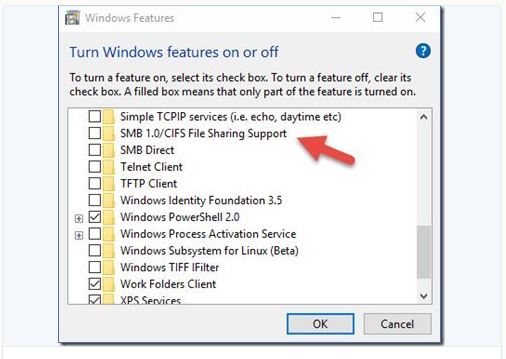
Disabling SMBv1 support
The vulnerability can also be closed by completely disabling SMBv1 support. Run this command in cmd (run as administrator).
dism /online /norestart /disable-feature /featurename:SMB1Protocol


To prevent yourself from future Ransomware Attacks:


Back up necessary data from time to time. 

Update your OS to the latest. (the recent NSA exploit leaks about OS like XP will trigger more ransomware with different flavors)

Updating Antivirus or having the best, does not provide necessary protection against such attacks.

Do not open any emails from unknown senders.

Close the ports which you do not use.

Check out my other post relating to Ransomware Risk Mitigation


References:
For a detailed view on the attack:
https://blogs.technet.microsoft.com/mmpc/2017/05/12/wannacrypt-ransomware-worm-targets-out-of-date-systems/


Wednesday, January 18, 2017

Layoff the Bhim App (For Now)


BHIM app the UPI payment app introduced by the Indian PM is just another UPI app.

There are far too many competitors of BHIM such ICICI UPI app, HDFC UPI app, Axis Pay, PhonePe, SBI Pay etc.

However, BHIM was hailed as the most secure

“BHIM uses three-factor authentication and hence, is relatively more secure from a consumer point of view. It also combines the convenience of a mobile wallet with the security of net banking,” he said.

When a user opens BHIM application for the first time, the application automatically binds itself to their device ID and phone number — both of which are unique. This means that the same UPI cannot be used from two phones. The BHIM application will also not work on a phone which doesn’t have a SIM card.

“This uniquely identifies not just the device but the active number. If there is some fraud…you have an operational number plus the device ID, which in some cases can be masked, but a combination of both makes it easy to track the cell phone and law enforcement agencies can physically trace the person, if needed.” said a security firm researcher.

“The third factor is the UPI PIN, set by the user, which will be required for every transaction through the application.” No user would be able to do transactions without the UPI PIN, he said.


However after few days after the release of the app, lot of people are complaining about the app being sluggish.

There are other security concerns of the app such as,

  • The back button is not restricted and you can move back and forth the payment page.
  • The app is prone to SQL injection attacks.
  • The app is slow, (in fairness so are majority of the UPI apps)

So it is definitely worth to wait before you jump onto BHIM. The app makers stated that they are working on the issues and will release an update at the earliest.

Wednesday, December 14, 2016

Uber Tracking your location after completing your Ride.


Uber has said that it will track your location for 5 mins after completing your ride.
It claims, it will help in better consumer experience as location is key in it's game.

Till now we do not know how long it has been tracking its users after completing their ride. I did happen to read the wired article, which says how Uber has a "God View" and how it is a source of entertainment at parties :|
Yes, Uber app in the background can also track your location.


To disable the tracking, you will need to disable location permission on ur phone;
for all your apps or Uber specific location permission(Android Marshmallow and above)


Friday, December 9, 2016

Rise of the Mirai Botnet

Image result for botnet 


Mirai Botnet is the one which you might have heard that kicked dyn out of gear.
Thats right it is indeed the recruiter of an army of zombies ie. unsecured Internet Connected devices.

Internet connected devices such as your computer, router, webcam etc are all vulnerable to this malware.

The malware follows a simple strategy of compromising the internet connected devives by

Take Over the Device

using the default username and password of the device to gain access and add it to its army.
It also uses BruteForce Dictionary attack to gain passwords.

Clear the hurdles

Mirai also kills any existing malwares on the devices, so that it maximizes its potential. It also prevents
remote login so that it can not be stopped in the middle of the attack.

Execute


Once Mirai is in control of the device it waits for commands to be executed by the central server.


The Do-Not List:
It also has a list which it refrains from scanning.(for unknown purpose or to prevent from gaining attention.)

Once the botnet has enough devices in its army, it begins attacking the target via DDOS.


How to Prevent Mirai.?

Change your default/ weak password of your devices.

Disable remote logging/ wan . (if not used.)


Attack on DYN.
DYN is a DNS management systems which helps in the lookup of the the domain names to the IP addresses.
Since this DNS infra was attacked by mirai botnet the DNS lookupsites like amazon, twitter and many other sites were unable to access to the consumers.

The attack was mitigated by using scrubbing services (the traffic is rerouted to new servers or data centers which identifies fake trafficfrom the real one)
On rebooting the devices, the attack can be stopped.

The source code has been released on one of the hacker forums,
https://github.com/jgamblin/Mirai-Source-Code


Thursday, December 1, 2016

Watchout for Gooligan- Check if you are affected now!

Image result for red android


Gooligan is a malware that affects android os phones particularly V4 &5. This malware was reported first mid of 2016. This malware steals the authentication tokens of your google accounts such as drive, mail etc and installs adwares which inturn generates revenue for the installed apps.

More Details:https://plus.google.com/+AdrianLudwig/posts/GXzJ8vaAFsi

List of Apps installed by Gooligan: http://blog.checkpoint.com/2016/11/30/1-million-google-accounts-breached-gooligan/

Check here if your account is being compromised
https://gooligan.checkpoint.com/

If you find your account is compromised then it would be safe to do a clean install of the OS on your phone, a  factory reset on your phone wont get you that far. Also change passwords immediately of your google accounts. Gooligan does not access user data nor modifies OS/ system files.

Use Google Play Store to download apps and be careful while installing apps from 3rd party websites.

Sunday, November 27, 2016

Paytm POS app rolled back on Security Concerns

Image result for paytm merchants

Paytm which has been in the news ever since the demonetisation drive in India, had rolled out a POS app. This app has been rolled back citing security concerns highlighted by the concerned parties.

The current app allows payment via QR code. Customer scans the QR code of the merchant via the app to make the payment. Transferring money instantly to the destined account/ wallet. This is a secure way to make a payment because QR code payments use tokens to make the transaction. 

What was the problem with the new POS app?


This new feature would require the customer to key in his card number and PIN into the Paytm app of the merchant. 

As we are aware of key loggers and other screen grabbing softwares which can be installed by the merchant in his device, the unaware customer keys-in his card details into the Paytm app of the merchant while being unaware that it is being recorded by the key logger app thus the customer's card data is compromised.

Paytm has said repeatedly that it is a PCI-DSS (Payment Card Industry Data Security Standard ) and conducts several security audits. One of the main requirement to comply to PCI DSS is that the merchant should not hold card data of its customer in it's systems. While it might be true that Paytm does not hold customer card data, but this new feature in this application would allow the customer to pay by entering his card details just like any other e-commerce site's payment page. The same risks you would face while entering the card details online, you would face the same here except the added risk that the payment you do is not on your device but that of the merchant.

Image result for pos device

As many would agree that the same type of attack can be performed on the POS by installing some malware / malicious code. It is true that such an attack can be performed but it requires some deep knowledge of the working PED/ POS device and being able to post / transmit the data. There are encrypted PED/ POS devices but even they can be fused with malicious code. But the hack (if you would like to call it that) is not universal to all devices. There are many vendors of POS devices in the market and each have different set of instructions/operations, thus hacking such a device actually needs extensive knowledge of the device and the system it is placed inn. 

But in case of the POS that was in the Paytm app it is vulnerable to key-loggers and performing a  keylogging attack doesnt need an expert. It is fairly easy to install an app from the app store and set the keystrokes entered on the device to be mailed every set period of time.

Paytm has said that it will rollout the app after getting additional certifications.


Wednesday, November 23, 2016

BlackNurse - A new variant of DDOS

Image result for ddos


This new attack was discovered by TDC engineers. http://www.blacknurse.dk/

The attack falls on the lines of an ICMP flood attack. The ICMP flood attack involves flooding the target with large amount of traffic whereas black nurse attack requires a very minimal ping traffic while leveraging on ICMP Type 3 Code 3 ( Destination Port Not Reachable ) .

An attack from a laptop can go upto 180 megabits per sec and bring down the firewall effectively. The attack is effective and Cisco and Palo Alto and a few more. This attack is possible only if you have allowed ICMP Type 3 Code 3 to outside interfaces.

http://soc.tdc.dk/blacknurse/blacknurse.pdf

Test your system with this Proof of Concept Code to check if you are vulnerable.
https://github.com/jedisct1/blacknurse

If vulnerable check with your vendor website to mitigate the risk.

Worst case- your router crashes and after the flooding, your router comes back up.

Tuesday, October 25, 2016

Secure your site using Cloudflare for free

Want to secure your site immediately due to the rise in DDOS attacks?
Use Cloudflare

what is cloudflare?

It is a CDN - Content Delivery Network, with added security measures.

In short it caches your website content across all its servers around the world. So that it can serve your website consumers at a quicker pace.


While preventing your site from a DDOS attack / Spam Bot/ SQL Injection. There are many players in CDN which is led by Akamai. 

Usage of cloudflare is known to improve the performance of your website and the security.
The process is fairly simple. Try it out.


Monday, October 17, 2016

Ransomware Risk Mitigation


RANSOMWARE:
Malware that locks/encrypts your system / files and requires you to pay a ransom amount to decrypt/unlock your system/files.


RANSOMWARE is a serious issue addressed by all the AV companies and the security agencies like the FBI.
The average ransom demand is now $679

RANSOMWARE targets end users and targets on enterprise users is on the rise usually by spear phishing emails.


Stages of RANSOMWARE:

Infection: The script / program / exe file that contains the code to encrypt all your system files.

Search & Encrypt: Most of the times, the file type is configured. The script searches for system files / .docx xlsx and other specified files and starts encryption.

Notification: The affected system is notified that the system is locked and a ransom needs to be paid.
Along with a countdown timer indicating the time left to pay ransom after which you will never be able to recover the data. 

Something like this:


RANSOMWARE is not a Virus.

RANSOMWARE informs the user after the attack and requires you to pay up to free your data which is held ransom.

Why isn’t your antivirus/ security suite not enough?
AV’s work on signature recognition of a file / program to detect whether it is a good egg or a bad one.

There are quite a few famous RANSOMWARE such as TesCrypt, Locky, Waltrix etc. But the main problem is that there are many types of custom RANSOMWARE. Which renders the signature recognition useless. 


Ransomware has gained a lot of steam in the past year. It has even evolved to “Ransomware as a Service”, it is being sold on the market like any other software service. One might also witness a very immense competition between rival groups, with each group sharing the decrypting keys of its rival.


Preventing a RANSOMWARE Attack:

Employee Training: Most of the employees working in enterprise / Health Industry are not aware of RANSOMWARE. They need to be made aware and trained in how to prevent and report such an occurrence.

Phishing: Beware of phishing emails. RANSOMWARE can also be disguised in macros and sent across via email stating “2016 Store Rollout Plain.xlsx” (something that looks genuine) Macros have unlimited ability to execute a program or script.  Disable macros when not required.

Click Bait: Many links are leached with RANSOMWARE infections causing the script / payload to download via JavaScript and other means and affects the system

Internet: If you are aware that files are being encrypted, shut down the internet immediately and also power off the system. This will help you in preventing the infection spread. Disconnect any network drives connected to the system. As RANSOMWARE has a tendency to go after it too.

Backup: Have a scheduled backup taken often. In case of RANSOMWARE infection system can be restored using the backup/ windows restore. Beware some RANSOMWARE even encrypt the shadow/ backup files.

Public Wi-Fi: Beware of public wifi’s best if you prevent using public Wi-Fi for official work. Using man in the middle attack via a pineapple router the attacker can easily move the infection to your system.

Update: Keep updating your system via patches and the softwares, applications which you use regularly to safeguard against the latest vulnerabilities.

Show Hidden File Extensions:  This could prevent the user from running an exe file disguised as a video or picture file.

Misc: You will need a behavior driven detection system that looks out for malicious activity of a program or a user. Since RANSOMWARE attack can be unique every time, having such a detection system will truly serve the purpose. Ex: https://www.barkly.com/


In case you are attacked:
·         Inform the authorities.
·         Isolate the system from network.
·         There are many free tools out there that might help you unlock. You may try them. Ex: Trend Micro Crypto-RANSOMWARE File Decryptor Tool
·         Paying the Ransom should be your last option. Many organizations have ended up paying. Many cases the decrypter key is not provided even after the payment of the ransom.

References: Osterman Research

Monday, August 22, 2016

Web Watcher - Why you need to crawl the web for confidential data leaks of your company?

Abstract: Understanding the need to crawl notorious sites of the World Wide Web for Leaked/Compromised/Hacked data and to place a mechanism in place to report such findings so that the necessary action may be taken at a quicker pace to minimize the impact of the attack.

Why?
As we know in today’s world no amount of security can assure a system impenetrable, the least we can do is step up our guard and place a mechanism in place that minimizes damage in case of a worst case scenario.
Hackers have perfected few techniques to exploit money from their plunders of hacked data.
Hacked Data may contain email credentials, credentials of social networks, API keys, Subnet IPs, Password hashes, Machine configuration info etc. They sell the data to the victim’s rivals/competitors or in certain cases they end up blackmailing the victim.

Hackers /cyber criminals tend to share the results of their data heist on the open web on sites such as pastebin, slexy, reddit, 4chan and many other loosely moderated sites. They often share glimpses of the hacked data in order to gain attention and to pull up some interested buyers for their entire data dump.

This makes it evident that we need to be on the constant lookout for such data leaks in various forums, text sharing sites, social media etc. Since the data to be monitored is large it would be impractical to do it manually, hence we need a system/application in place to do the same. Once the data that is leaked comes through to us, it is upto the security team to take the necessary action which may be anything from changing the passwords/api keys or suspending the accounts etc or whatever action is apt for the situation.

Scope
To define a monitoring system which identifies data leaks of a specific Individual/company along with plausible data sources and tools which generate reports. The action to be taken on the data leak completely depends on the type of the system/data which is not in the scope of this 


Everyone Else is doing it?
Yes! A lot of the big companies do have a system in place for the sole purpose of looking for data leaks of their respective companies on the open web. Ever since the infamous hack “50 days of Lulz” everyone is rushing towards this approach. Cyber Security related companies constantly do this.

Overview of the system that needs to be in place to look for data leaks.

Data Source 1: As you can see in the above diagram, the data from text sharing sites are pulled up for analysis via their API and using regular expressions in our Pattern matching engine we shall pull up any leaked data.
Data Source 2: There are few twitter bots out there such as @dumpmon which monitor hacker’s playgrounds, forums and their popular sharing platforms and tweet in case of any leaks detected.

Data from such bots can be useful as it provides a defined amount of data to search, passing it to our PR-Engine will do the rest of filtering.
Data Source 3: Using custom search engine searches and using tools such as scumblr and integrating it with our system would help us get the leaked data at a quicker rate.

The key thing to be considered here is how quick we can get the data that interests us and make sure it is attained with minimum resource consumed.

Tools: There are no fully fledged commercial tools for this purpose. On exploring I found a few good tools.
Scrumblr & Sketchy: This is a tool developed and open sourced by Netflix. The purpose of the tool is to collect information on the web that interests you/ your company. This tool is currently being used by Netflix Security team.


HaveIBeenPwned: This is a online tool where you can search for a keyword it shows you if your account is compromised. It has API support too.


Amazon also monitors the web; there have been multiple instances where users are alerted that their API keys of their instances are on the open web. We are not aware which tool they use for this purpose.
However there is an open source tool called Security Monkey which monitors policy changes and alerts on insecure configurations in an AWS account. 


Pystemon
I happened to try out pystemon which is an open sourced tool built using python.
Below are the results.
Step 1: I posted a test email Id with some data to the text sharing site called slexy.

Step 2: I configured my system to be able to run pystemon.
Step 3: I set up the regular expression I was looking for in the tool configuration.

Step 4: Run the program

Step 5: Within a minute, I managed to find the text which I had shared in step 1 downloaded along with all the information surrounding it into the Alerts folder.


This is just a simple demonstration on how humongous data can be mined easily with the tools available, on customizing such tools we can set the path to effective monitoring of the web for confidential data leaks. The thing common in all tools is that they have used python.  Python is usually used to scrape data from large dumps and it is effective in doing so.

Conclusion: Using the information in this document as a precursor and setting up an effective system or an application consisting of multiple inbound data sources, to monitor the wide web and minimize the impact on the customers/victims thereby adding more Trust towards the brand which would not only be essential but pivotal in today’s world where security can be an illusion.

References: