Thursday, February 27, 2014

Employer E-Sewa PF India Annexure ii upload tool

This is an unofficial tool to help ease the process of uploading Annexure ii to the e-sewa portal.
The official instructions i.e the format for upload is specified here http://www.epfindia.com/ECR/AnnexureII_ErrorCodesList_10042013.pdf

Its a lot complicated for non tech people. So to simplify things I have created an excel sheet where you need to enter the employee details and then just click on a button which will generate the file to be uploaded in the specified format by EPF India.

You should be able to do it in 5 simple steps,  let me take you step by step

Step 1: Download the excel sheet Click Here

Step 2:
These are the columns you ll need to enter into the excel sheet

Open the excel sheet you will find the same columns 

So start filling your employees details, I shall fill the employee Anil Singh on my sheet

Step 3: 
Click on the generate file button.
Step 4:
Enter the path for the file to be stored along with the filename with the extension .txt
ex: d:\FileToBeUploaded.txt and click on Ok


Step 5:
Go to the destination folder/ drive whatever you gave in the above step and open it

Check if all the records are there and then just upload it in the portal.

Important: Every time you plan on using this sheet, use a fresh one, don't use previously entered sheets.
                Before uploading the text file you need to make sure there are no extra lines in the file.

If any doubts or clarifications mention them in the comments, I shall respond. If any errors in upload, epf provides the error codes etc,  post them too in the comments.

Later I shall cover the code of the Macro.

Add new row data to gridview from textbox Asp.net C#

Requirement was to add new row data to gridview from textbox. The data populated in the gridview was from a datatable and not in a DB.
Problem occurred when the datatable was static the following error appeared "A column named 'columnname' already belongs to this DataTable." This was because after a record is saved the pageLoad event is triggered and under pageLoad we had created ColumnNames. So, the error popped up when we tried to add the same column name over and over again.

Solution was to declare the datatable as static so that the old rows are saved and not overwritten and also to check if the no. of columns in the table is not zero which will indicate that the datatable is already created.


static DataTable dt = new DataTable();

protected void Page_Load(object sender, EventArgs e)
{
if (dt.Columns.Count==0)
{
dt.Columns.Add("name", typeof(string));
dt.Columns.Add("age", typeof(int));
}
}

protected void Button1_Click(object sender, EventArgs e)
{
dt.Rows.Add(TextBox1.Text, Convert.ToInt32(TextBox2.Text));
GridView1.DataSource = dt;
GridView1.DataBind();
}

Wednesday, October 3, 2012

Sorry, Movie Maker can't start. PROBLEM SOLVED

Movie maker error c945000e
Error you get when you click on Windows movie maker
This is the annoying error you get while trying to open Movie Maker.
"Sorry, Movie Maker can't start. Make sure your computer meets the minimum system requirements before trying to start Movie Maker again, and then try to update the driver for your video card if Movie Maker still doesn't start."
As said I tried updating my video card driver but it was already upto date.
The Microsoft Support said that the new versions had some bugs in it and it affected some graphic cards.

Here are the Solutions that will work out:

Soln 1: Update your graphic card. HERE are the LINKS for the drivers. 


Soln 2:  Offline Install of Live Essentials 2011 not 2012 . In this LINK go to Show all and select Vista and select english (though your using Windows 7 ) as shown in the image. The download will start. The file size is 214 mb.

Once the download is complete, uninstall Windows Live Essentials from the Control Panel (How to Uninstall Windows Live Essentials) and then Restart System.
After Restarting Install Movie Maker from the freshly Downloaded Installer File.


Soln 3: Recommended . This worked for me.

5 Simple Steps:
Step 1: Download the offline installer of Live Essentials 2011 as mentioned in the Soln 2.

Step 2: Create a new USER ACCOUNT on the system with ADMINISTRATOR privileges (How to create admin Account)

Step 3: Uninstall Windows Live Installer from Control Panel. (How to Uninstall Windows Live Essentials) Now Restart System.

Step 4: Login to New Administrator account that you created in STEP 2. Install Movie Maker from the freshly downloaded file as mentioned in Step 1. Once you start the Installer Select USE RECOMMENDED SETTINGS. 

Step 5: Start Windows Movie Maker . No error.


Saturday, September 29, 2012

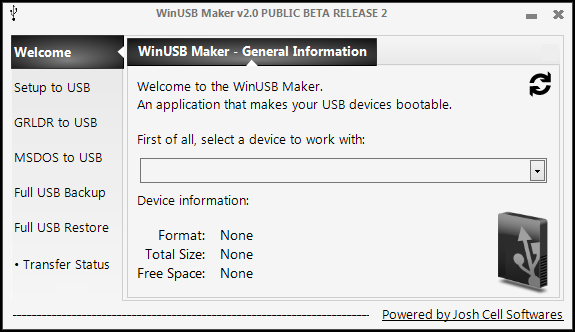
Make Windows 7 / XP bootable with WinUSB Maker (FREEWARE)

Update: This works even for windows 8.
Make usb portable in 5 simple steps using this software (Freeware)


A simple software to make your pendrive bootable and use it to install win 7 / XP.
1) Download the above software here and install it. (you will require Dot Net Framework)

2)Insert Pendrive and select the drive in device to work with

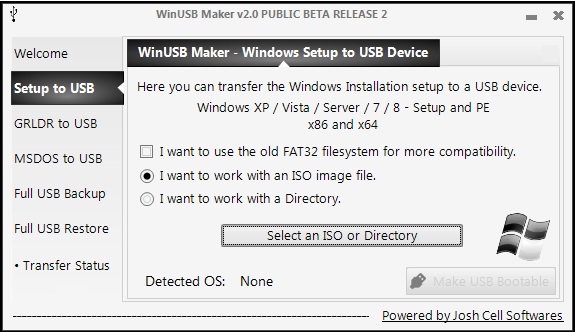
3)Select Setup to USB

Select 2nd option ISO image file if you have an image file

else

select 3rd option work with directory and select the win 7 / XP installation directory (i.e either the CD Directory or any other place in ur HD


4)Click select an ISO or directory and select ur ISO / Directory

5)Click Make USB Bootable

Tuesday, September 25, 2012

How to delete facebook account permanently and Immediately ? [Outdated]


Difference between deactivating your facebook account and deleting is that, if you deactivate your account, your account is deleted temporarily i.e your profile wont be visible to  anyone in facebook to activate your account again, you just have to login with the same user id and password.  Click here to deactivate

On the other hand if you delete your account it ll be gone permanently.

Remember you cant reactivate your account if  you do this.

There are 2 ways to delete your account


1) log in to your facebook account and fill out this form.
you will be asked for password confirmation and you'll be logged out. You will receive an email saying that your account has been marked for permanent deletion and you have 14 days time to change your mind(mean while your account will be deleted temp from facebook i.e ur account wont be visible to anyone in facebook). If you change your mind in 14 days just login to facebook with the same usrname and password. If its past the 14 day time limit your account will be gone forever.

2) If you feel 14 days is a long time to wait , then follow these extreme steps (NOT RECOMMENDED)
Upload adult xxx pics onto your account also set one as profile pic.(better to do after unfriending everyone)
Report abuse from a friends profile .
Your account will be gone in few hours. (Permanently)


Disclaimer
Use of this website or material is, at all times, "at your own risk." If you are dissatisfied with any aspect of the website, any of these terms and conditions or any other policies, your only remedy is to discontinue the use of the website. In no event shall I, the website, or its suppliers, be liable to any user or third party, for any damages whatsoever resulting from the use or inability to use this website or the material upon this site, whether based on warranty, contract, tort, or any other legal theory, and whether or not the website is advised of the possibility of such damages.

Monday, September 24, 2012

Shutting down computer after utorrent downloads or at a particular time


This may come in handy when you wanna shut down your computer after some time like an hour or so. Also for connections like BSNL which have free download only from 2am-8am. Here are two methods without the use of any additional software.

Option 1: utorrent has an option for this utorrent->in menubar options-> Auto shutdown-> select shutdown after downloads complete or hibernate after downloads complete

Option 2: Sometimes your download doesn't complete in time coz of less apeed or seeds etc. So now
start > run > type cmd and hit enter
cmd opens

type shutdown /s /t and the amount of time you in which you want your system to shutdown/turnoff in seconds

your command should look like this

shutdown /s /t 60

this will shut down the computer in 60 secs

Here:
/s means shut down
/t means time
60 means 60 secs

After you type in this command and hit enter a small pop up at the corner of the screen will tell you how many seconds is left for the computer to turn off.


Suppose you wanna cancel the command type
shutdown /a


If you feel calculation of time in secs is hard then use this website
http://www.onlineconversion.com/days_between_advanced.htm

calc the exact seconds and use it.


Sunday, June 17, 2012

First Aid info @ ur fingertips

Red Cross First Aid AppScreenshot of the iPhone version of the First Aid by British Red Cross mobile app

Get info on first aid, emergencies like accidents, burns, etc. The app is local i.e doesn need internet connection. provides quick access. Download NOW
http://www.redcross.org.uk/What-we-do/First-aid/Mobile-app