Monday, November 8, 2021

Mi Mop bot review

 Mi Mop bot 2021 review (after 3 months usage)


Exceptions\Issues navigating when faced with:

Piano stand\iron stand bottom knobs. The bot is not able to gauge this, so it keeps crashing into it.


Long curtains touching the ground or almost touching the ground. The bot finds it hard to clean near by, as it sees this as an obstacle. So while cleaning you can fold or tie the curtain up.


Cleaning under computer chairs is fairly ok. Again it depends on the height of your chair.


Other small objects like - Papers, leaves, ropes, chocolate wrappers, toothpicks - get stuck inside the vacuum or under the bot, preventing the bot from cleaning properly. It is better to remove such objects before cleaning or pause the cleaning when the these objects are stuck with the bot. Remove and resume the cleaning.

Certain doormats which are thin tend to get moved around by the bot, it is better to have hard and sturdier door mats or to remove them temporarily. 


Cleaning the device:

Cleaning the roller is a tough task. Lot of hair strands tend to get caught up in it. 

Cleaning the mop cloth is required after every mopping. Do not keep the mop cloth to the bot when not in use. 

Cleaning the dust compartment box is a little tricky - there is a trick to open the white box. 

The black box with the water compartment requires frequent filling of water when mopping. It needs cleaning too after completion of task.

Jet black colour of the bot - prone to dust build up. Needs to be wiped from time to time. 

Clean all three wheels , else it would leave tracks during mopping. 


Map Feature:

Requires that you have strong wifi coverage across the house. 

Either use Mesh routers or place the wifi router in a place where wifi comes to all edges. (You can use wifi heat map on your mobile to check if wifi connectivity is available on all corners.)

Use the edge cleaning mode to map the house before performing any task. 

Later classify the rooms, this will enable you to selectively clean rooms which you want.

While mapping first time, try to map the edge as much as possible. 

ex: remove the flower vases \ chairs \ small furniture from the edges.

Make sure you start the mapping from the charging dock. 

If you do not follow the above, you will find difficulty in mapping the home and face issues.


UseCases:

During the course of time or when you move your fridge \ bed (which was lined up to the wall) to clean underneath it.

You will have to use selective area cleaning (instead of room cleaning.)If you select room wise cleaning in such a scenario, the bot will use the old map and it will ignore the new space which was got by moving the appliance or furniture.

We are NOT supposed to fill any cleaning solution in the water tank compartment. If required you can sprinkle some diluted cleaning solution on the floor.

Device may find it difficult to navigate to selective areas if there are restricted zones in between. 

So it is better to lift the bot and place it where it is required. ex: if there is a spill of sugar on the kitchen floor, when you mark the area to be cleaned via the map. The bot might find it difficult to navigate from the DockingStation to the cleaning area. You can also use the "Manual Navigate" option in the app.


Internet failures during cleaning:

If it is a matter of few secs, there will no issues. If it is more than a minute, the bot looses its context and has issues retaining the map \ cleaning info. In such cases, use "Selective Area Cleaning" to continue cleaning. However this requires some manual supervision.

Note: During the initial edge cleaning for the mapping - make sure the internet stays on. 


There is a gap between the intended cleaning area edges and the actual cleaning. So you will have to ensure that you give a bigger cleaning area, so that your intended areas are cleaned correctly.


If you are having trouble mapping the entire house due to some reason. You can either just turn on the sweep \ mop mode. 

It will do a complete cleaning on its own. Or you can place it inside a room and lock the door, it will complete the cleaning .


Do not turn off the docking station in the middle of cleaning. The bot will either end up crashing into the device or it will end up roaming about.

You will require to place the bot and docking station in a place where there are no obstacles for 90CM each side.

I would recommend using the vacuum mode separately and then the vacuum and mop mode. 

It can clean without a map. It will mark the edges and go about cleaning it. 

(There are other competent models in ILife which are cheaper, if you do not want the mapping\selective area cleaning\ restricted area feature.)

Error Message: "Please complete the cleaning task first and make sure remember map is enabled"


If you see the above message, it means that you have to set the Remember Map setting in the app.

Followed by selecting edge cleaning ie "Vacuum along the edges" option in the map. This will map your entire house. After that with the help of Area Editor you can classify various rooms.

Follow the "Map Feature" instructions in this article to solve this problem.


Conclusion:

Good at cleaning under tables, chairs etc where the broom is difficult to fit.


Note: It picks up all the small dust just like your vacuum cleaner.  (Explore Karcher Vacuum cleaner for your vacuuming needs)

It serves as a good relief for your cleaning chores , as it does most of the work. Definitely it is not an alternative to the manual work but it does atleast 80% of the actual cleaning.

Mopping - Good enough. (tested for Ceramic Tiles, rubber mat flooring) 

Good suction power.

Though this has only one fan\brush, it does a decent job.

Price point is very competitive, during sale season you will find it for 20k INR

S-mode and Y-Mode cleaning. S-mode is quicker. Y-mode is slower but mopping is better. Choose it depending on your need.

Missing:

Dirt sensor is missing in this bot. It is available in Roomba. (You can use targeted cleaning to overcome this.)

Software or App can be refined. It requires a good amount of knowledge to operate. (Use it as a regular cleaning bot without the mapping function.)

Obstacle avoidance can be better. (Supervise the bot for the first few times in your house, understand the objects which the bot finds difficult to navigate - then adjust them accordingly)

Sometimes the map gets adjusted drastically in the app while cleaning, however this does not affect the cleaning. The GPS accuracy can be improved.

If you are using the map feature to clean various rooms, the cleaning requires wifi. It cannot navigate with map alone, though the initial map is done. 

Support from MI is not upto mark. Most of the service people do not know the product well. Mi support forums on the web require you to use VPN and proxy sites to access. 


Cleaning Algorithm:

It is observed that it breaks the room into smaller parts based on the furniture\ obstacles and cleans the larger area that is emptier and then moves on to small areas. 

It is normal for it to find a different pattern every time it cleans or mops.

Wednesday, February 21, 2018

Remove NsCpuCNMiner.exe or NsCpuCNMiner64.exe manually

Remove NsCpuCNMiner.exe manually.

These are the steps I followed when one of my colleague's system was infected with this Malware.

What it is ?
It is a process which runs in the background and mines for crypto-currency using your system as the resource.


Symptoms:
Disk utilization & CPU usage will be max. So your system will be slow.
Application will take longer time to open.
In some cases you get some popups in your web-browser.


Steps to Remove:

Step 1 - Stop the process
Goto Task Manager->Services -> select NsCpuCNMiner or NsCpuCNMiner64 -> right click - end process

Step 2 - Remove related extensions from browser
Goto chrome browser extensions and check if any miners are present and remove them.

Step 3 - Disable From startup
Goto Win+R run -> msconfig.exe -> startup -> Disable the NsCpuCNMiner or NsCpuCNMiner64
For win 10
Goto task manager -> startup services -> Disable the NsCpuCNMiner or NsCpuCNMiner64 or Folder (Yes it is the malware and not the WindowsExplorer process)

Step 4 - Delete the source file
Goto Win+R run -> type %AppData% -> Navigate to "Roaming" -> "Images" and delete all the contents of the folder. (This contains the exe :see image)

Step 5 - Delete from registry
Goto Win+R run -> type regedit -> Once the registry editor is opened -> type Cntrl + F
-> search for "NsCpuCNMiner" and delete every occurrence of this.

If you face any issues while removing the malware, do comment below - I shall respond.

Tuesday, February 6, 2018

TFS workspace problem

TF400018: The local version table for the local workspace MY-PC;My User could not be opened. The workspace version table contains an unknown schema version.

Click the box labelled "Workspace".
    Click on "Workspaces".
    Delete the corrupt workspace profile, accepting the warning.
    Re-connect to TFS and open "Source Control Explorer"
    Create a new workspace
    One by one, map your projects to the same folder as before
    You will be presented with a list of conflicts, where you have matching writable files in the folder already.
    Choose "Keep local copy" for each file you had checked out before, and "Take Server Version" for any files changed by other members of the team that you didn't have the latest version for. This might take a while depending on the length of the list, but it is worth comparing versions for any file you are unsure of.

    Most of the cs proj files will show contain the files you have added,
    but it wont show up in the solution explorer.
   
    Click on ShowHiddenFiles, select the files that do not have
    a + sign (add) or a red tick mark (CheckOut) and exclude them from project
    and right click and include them in the project.
   
    This should solve the problem

Sunday, May 14, 2017

WannaCry Ransomware

Ransomware .
Ransomware - a type of malicious software designed to encrypt all your files, which will not be decrypted by the attacker until a sum of money is paid.

Check out my other post relating to Ransomware Risk Mitigation


WannaCry Ransomware :
This ransomware spreads via known vulnerabilities, which was patched recently by Microsoft MS17-010 . Once the system is targeted the files are encrypted and a countdown appears. The popup demands $300 dollars of payment to be made via bitcoin.


Which files are encrypted?
Almost all common extensions.

What to do if you have been attacked by WannaCry?

For now, do not pay the ransom. Restore the files from your backup.
Most of the previous ransomware attacks have a  way to decrypt the files without paying the ransom. However for wannacry at this moment there is no way.

Has the infection been contained?

Yes the infection being spread has been halted for now. Thanks to the good intentions of a researcher called MalwareTech.

 but everyone seems sure that another such attack is imminent.


Precautions to be taken:
  

Windows Update MS17-010
The virus uses ETERNALBLUE exploit, which is closed by Microsoft security update MS17-010 released in March. I recommend that you check update center for presence of such an update (by code) on your computer (for example, code for Windows 7 will be KB4012212 or KB4012215).
If updates are not installed, you can download them from official Microsoft website:
https://technet.microsoft.com/en-us/library/security/ms17-010.aspx


Close ports 135 and 445
According to the reports of antivirus companies, wcrypt penetrates computers through SMB (Server Message Block) ports. To prevent penetration, we block the ports 135 and 445 through which the virus penetrates (in most cases they are not used by ordinary users).
To do this, open the console with administrator rights (cmd.exe -> run as administrator). And we execute in turn 2 commands (after each command there should be status OK).
netsh advfirewall firewall add rule dir=in action=block protocol=TCP localport=135 name="Block_TCP-135"

netsh advfirewall firewall add rule dir=in action=block protocol=TCP localport=445 name="Block_TCP-445"


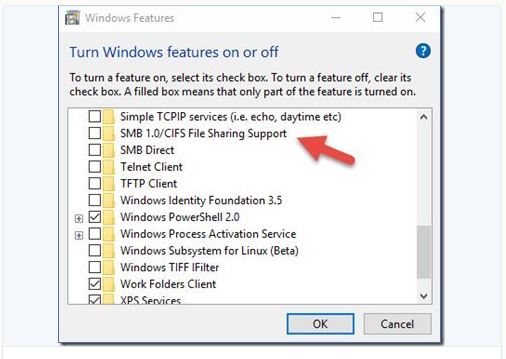
Disabling SMBv1 support
The vulnerability can also be closed by completely disabling SMBv1 support. Run this command in cmd (run as administrator).
dism /online /norestart /disable-feature /featurename:SMB1Protocol


To prevent yourself from future Ransomware Attacks:


Back up necessary data from time to time. 

Update your OS to the latest. (the recent NSA exploit leaks about OS like XP will trigger more ransomware with different flavors)

Updating Antivirus or having the best, does not provide necessary protection against such attacks.

Do not open any emails from unknown senders.

Close the ports which you do not use.

Check out my other post relating to Ransomware Risk Mitigation


References:
For a detailed view on the attack:
https://blogs.technet.microsoft.com/mmpc/2017/05/12/wannacrypt-ransomware-worm-targets-out-of-date-systems/


Tuesday, April 25, 2017

Removing empty pages in SSRS Report.

How to get rid of blank pages in PDF exported from SSRS

This issue occurs when you have added some components to your SSRS report and the page width has increased. Mostly it is the right margin of the page.


Resolution:  go to the report in design view.

                     Right Click > view > ruler

                     Reduce the width now. Your report will now be void of blank pages.


Wednesday, January 18, 2017

Layoff the Bhim App (For Now)


BHIM app the UPI payment app introduced by the Indian PM is just another UPI app.

There are far too many competitors of BHIM such ICICI UPI app, HDFC UPI app, Axis Pay, PhonePe, SBI Pay etc.

However, BHIM was hailed as the most secure

“BHIM uses three-factor authentication and hence, is relatively more secure from a consumer point of view. It also combines the convenience of a mobile wallet with the security of net banking,” he said.

When a user opens BHIM application for the first time, the application automatically binds itself to their device ID and phone number — both of which are unique. This means that the same UPI cannot be used from two phones. The BHIM application will also not work on a phone which doesn’t have a SIM card.

“This uniquely identifies not just the device but the active number. If there is some fraud…you have an operational number plus the device ID, which in some cases can be masked, but a combination of both makes it easy to track the cell phone and law enforcement agencies can physically trace the person, if needed.” said a security firm researcher.

“The third factor is the UPI PIN, set by the user, which will be required for every transaction through the application.” No user would be able to do transactions without the UPI PIN, he said.


However after few days after the release of the app, lot of people are complaining about the app being sluggish.

There are other security concerns of the app such as,

  • The back button is not restricted and you can move back and forth the payment page.
  • The app is prone to SQL injection attacks.
  • The app is slow, (in fairness so are majority of the UPI apps)

So it is definitely worth to wait before you jump onto BHIM. The app makers stated that they are working on the issues and will release an update at the earliest.